How to make a QR code menu (free, 2026)
Reprinting menus for one price change gets old fast. Build a QR code menu free in about ten minutes, and see where a static code stops and QR ordering begins.

What a POS does, its parts, the three real costs, and a checklist for choosing

Short answer: a POS (point of sale) system is what a cash register grew up into: it takes orders, charges cards, sends tickets to the kitchen, and records every sale. Modern systems go further and act as the hub of the whole business, menu, stock, customers and reports in one place. The true cost has three parts: software (free tiers to $50–150+ a month), hardware (near zero on a tablet, a few hundred to $1,500 for a full station), and card processing (typically ~2.6–2.9% plus a small fixed fee). Here is what each piece does and how to choose one, in plain English.
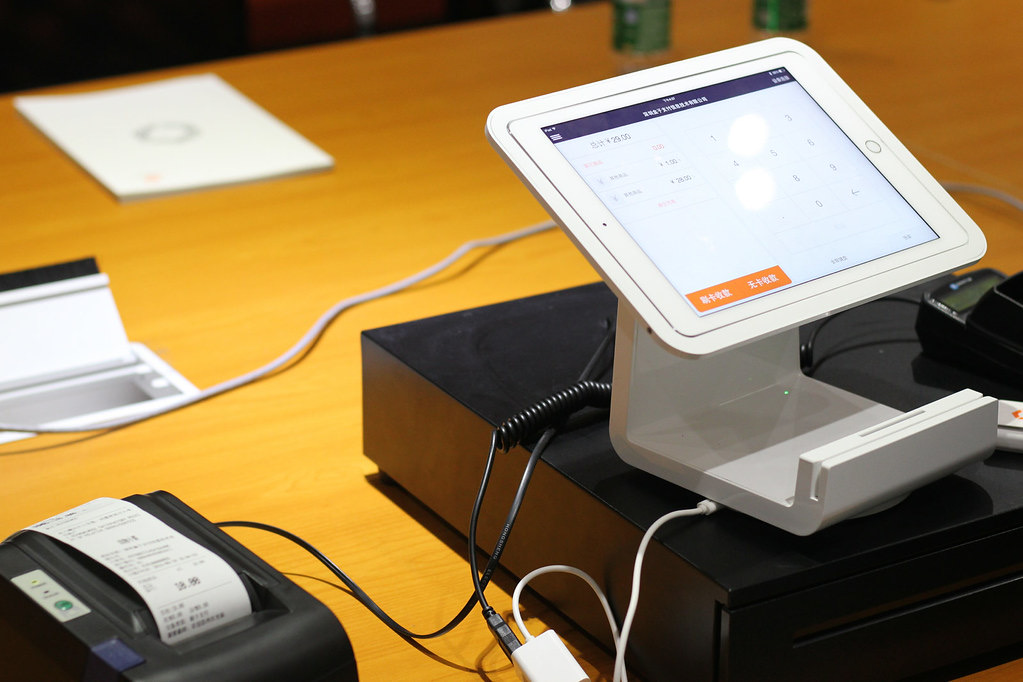
Follow one flat white and a toastie through the system. The order is tapped in (or arrives from your website or a QR table), modifiers included, oat milk, no butter. The card is charged in seconds. The toastie prints in the kitchen or lands on a kitchen screen, already routed to the right station. Stock decrements. The customer’s loyalty points accrue. And at 10pm the day exists as numbers: sales by hour, by item, by channel, average spend, staff performance. Every job in that sentence used to be a separate gadget or a clipboard; the POS is simply all of them agreeing with each other.
| Component | What it is | Do you need it? |
|---|---|---|
| POS software | The brain: menu, orders, pricing, reports | Always |
| Terminal / tablet | The screen staff tap | Always (an iPad counts) |
| Card reader | Takes tap, chip and phone payments | Always |
| Receipt printer | Paper receipts | Optional; email/text receipts cover most |
| Kitchen printer or KDS | Gets orders to the cooks | One of them, once you serve hot food |
| Cash drawer | Holds cash, opens on sale | Only if you take cash |
| Customer display / QR | Shows the total, takes the tip prompt | Nice to have |
Vendors advertise one number; you will pay three. Software subscription: free entry tiers exist and full-featured plans commonly run $50–150+ per terminal per month. Hardware: a tablet you own plus a $50 reader can be a complete starter kit; a dressed station with printer and drawer is a few hundred to $1,500. Processing: the percentage on every card transaction, usually around 2.6–2.9% plus ~10–30c, and at volume it dwarfs the other two, a venue doing $500,000 of card sales pays roughly $13,000–15,000 a year in processing regardless of whose logo is on the terminal. Compare systems on the TOTAL at your real volume, and be suspicious of “free” software funded by inflated processing.
Legacy POS lives on a computer in your back office: big install fees, on-site technicians, updates on DVDs in the bad old days, and data that dies with the hard drive. Cloud POS runs on ordinary tablets, stores everything online, updates itself, lets you check sales from the couch, and adds features monthly. The one legitimate cloud worry is internet outages, which is what offline mode is for: good systems keep selling and queue the data locally, then sync when the connection returns. Ask how card payments specifically behave offline, then test it yourself on a quiet day.
A POS that only knows about the counter is half-blind. The compounding value arrives when the POS, your online ordering, QR tables, loyalty and stock share one brain: 86 a dish once and it vanishes from every channel; points earned online redeem at the till; the weekly numbers describe the whole business instead of one register. Bolting four separate tools together with exports and goodwill is where independents lose evenings, which is the honest argument for platforms where the pieces are born connected (the fuller landscape is in restaurant management software).
What does POS stand for and what does a POS system do?
POS is point of sale: the system that takes orders, charges cards, fires tickets to the kitchen, and records every transaction. A modern POS is really the operating hub of a food business, the same system typically runs your menu, tracks stock, knows your customers, and produces the sales reports every other decision depends on.
How much does a POS system cost?
Three parts. Software: from free entry tiers to roughly $50–150+ per month per terminal. Hardware: a tablet-based setup can start near zero (use an iPad and a small reader) and a full station with terminal, printer and cash drawer commonly runs a few hundred to $1,500. Processing: the unavoidable one, typically around 2.6–2.9% plus a small fixed fee per card transaction. Always evaluate the three together; a “free” POS with high processing can cost more than a paid one.
What is the difference between a cloud POS and a legacy POS?
Legacy systems store data on a computer in the building: expensive to install, painful to update, and the data dies with the hard drive. Cloud POS runs on ordinary tablets, syncs everything online, updates itself, shows you sales from your phone, and keeps working offline then re-syncing when the internet blips. For independents there is rarely a good reason to buy legacy anymore.
Can a POS work if the internet goes down?
Good cloud systems have an offline mode: they keep taking orders and card payments locally, queue everything, and sync when the connection returns. Ask specifically how card payments behave offline (this varies), and test it before a busy service, pull the router plug on a quiet Tuesday and watch what happens.
What should a small food business look for in a POS?
Five things, in order: it must be fast for YOUR service style (count taps to sell your top item); modifiers and combos must match how you actually sell; it should speak to the kitchen (printer or kitchen screen); it should share data with your online ordering, loyalty and stock rather than living alone; and the total monthly cost (software + processing at your real volume) must be visible on one page. Demo with your own menu, never the vendor’s.
Do I need a POS if I already have online ordering?
Yes, unless you literally never sell in person. The deeper point is they should be ONE system: when POS and online ordering share a menu, a customer list and stock levels, an item you 86 disappears everywhere at once, loyalty points earned online work at the counter, and your reports show the whole business. Two disconnected systems means double menu updates and half-blind reports.
Storefront, orders, kitchen, CRM and marketing in one place. Start free in a couple of minutes, no card needed. Pop in your email and we'll take you straight to setup.
Reprinting menus for one price change gets old fast. Build a QR code menu free in about ten minutes, and see where a static code stops and QR ordering begins.
Somewhere along the way you ended up with nine logins that do not talk. This maps the restaurant tech stack layer by layer, and what a dozen point tools really cost.
Average order value is total revenue divided by number of orders. Here is how to calculate it, why it beats chasing traffic for margin, and how to raise it.
Storefront, POS, kitchen, CRM, marketing. One login, one bill. NZ$1/month for the first 3 months.
Start free trial